

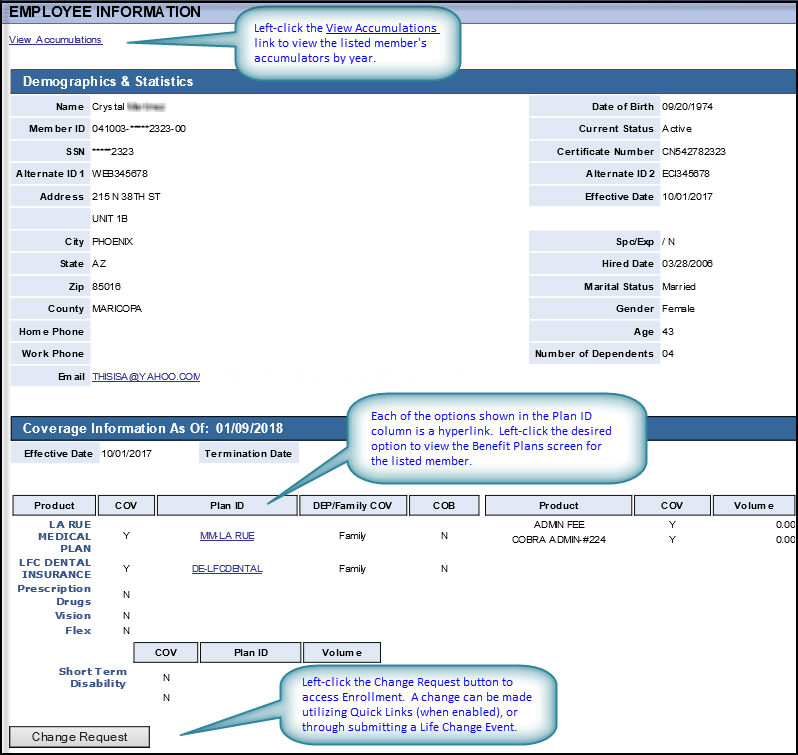
The Employee Information screen > Demographics & Statistics display lists the participant's basic demographic (i.e., personal) information, user remarks, coverage information and provides links to the benefit accumulator history and benefit plans.
Fields |
Definitions |
|
|
View Accumulations hyperlink
|
Left-click to open the insured's Accumulations screen. |
|
|
Demographics & Statistics |
Definitions are only provided for those fields whose meaning isn't self-explanatory. |
|
|
Name
|
First name Last Name format |
Date of Birth
|
|
Member ID
|
|
Current Status
|
|
SSN
|
|
Certificate Number
|
|
Alternate ID 1 |
Each member record now includes Alternate ID 1 and Alternate ID 2 fields. Once an alternate ID has been created for the member, you can use it to search for the member's record instead of the Member ID. Up 20 alphanumeric characters are allowed, this can include hyphens. It doesn't include spaces.
|
Alternate ID 2 |
See preceding description.
|
Address |
|
Effective Date
|
This is the member's initial effective date. For example, If the employee is terminated and later rehired, the first effective date reflects the first coverage effective date following the rehiring.
|
City |
|
Spc/Exp |
|
State |
|
Hired Date |
Indicates the employee's official date of hiring. The hire date is instrumental in defining eligibility dates and may be used when creating HIPAA certificates.
|
Zip |
|
Marital Status |
Options are: Married or Single.
|
County
|
|
Gender
|
|
Home Phone
|
|
Age
|
|
Work Phone
|
|
Number of Dependents
|
|
|
|
|
|
Remarks |
Remarks are user-defined in HEALTHpac.
|
|
|
Coverage Information As Of
|
|
|
|
Effective Date
|
This is the member's initial effective date. For example, If the employee is terminated and later rehired, the first effective date reflects the first coverage effective date following the rehiring.
|
Termination Date |
|
Product |
|
COV |
|
Plan ID |
Each of the options shown in the Plan ID column are also hyperlinks. Left-click the desired option to view the corresponding Benefit Plans screen (live link) for the listed member.
|
DEP/Family COV
|
|
COB
|
|
Product
|
|
COV
|
|
Volume
|
|