Select an existing health insurer or create a new insurer. To create a new insurer, you will need to assign:
an ASP ID
a ID
name
logo location
URL
language
date format
number format
decimal digits in currency
the contact e-mail address
Warning! Once you have selected an Insurer, you will see
a new set of menus. You will see the menus that someone logging on as
a Health Insurer would see
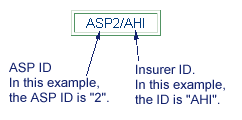
Tip: An easy way to identify when you have taken on another role is to look directly below the left-hand navigation bar. If you have taken on a different role than you logged in as (e.g., if you logged in as a System Administrator, but you are currently in a Health Insurer role to update a Health Insurer's information), you will see the ASP ID and the Role ID. See the example below: